Tingog Dial case studies

More conversations, fewer wasted dials, in any language

Tingog Dial is cloud call center software that runs in the browser: your agents dial, answer and talk across 60 languages from Chrome and a headset, with no servers to run.

"Tingog" means "voice" in Cebuano. Built by iConnect Technologies on Twilio's voice network.

100%More connected calls
60Languages supported
6 agentsOnboarded in 1 day

Case studies

Three calling problems, and how teams solved them

Outbound sales across time zones, a support line in many languages, and a move off a legacy dialer.

01 · B2B outbound sales

Getting past the phone menu and onto the buyer

My Supply Parts · parts supplier calling electronics manufacturers across the US and Canada

The challenge

The sales team calls electronics manufacturers in every US and Canadian time zone. Most calls land on a company phone menu or a voicemail box, so agents spend much of the day dialing instead of talking. Each lead has to be called within its own local hours, and prospects are slow to answer, or call back, a number they do not recognize.

The solution

  • Preview dialing, so the agent reads the account, the contact and the last notes before the call connects.
  • Local caller IDs that match each lead's area code, rotated with daily limits.
  • Calling hours applied in each lead's own time zone, including Canadian hours rules and holidays.
  • Answering-machine detection that hangs up on real voicemails at the beep but keeps company phone menus connected.
  • An in-call keypad, so the agent can press 1 for sales or dial an extension.
  • Smart retries for no answer, busy and voicemail, after a set gap and up to a set number of tries.
  • Returned calls ring the account owner, with the lead's details already on screen.

The results

  • 6 agents onboarded in 1 day
  • 100% more connected calls: 24% of dials reached a person, up from 12%
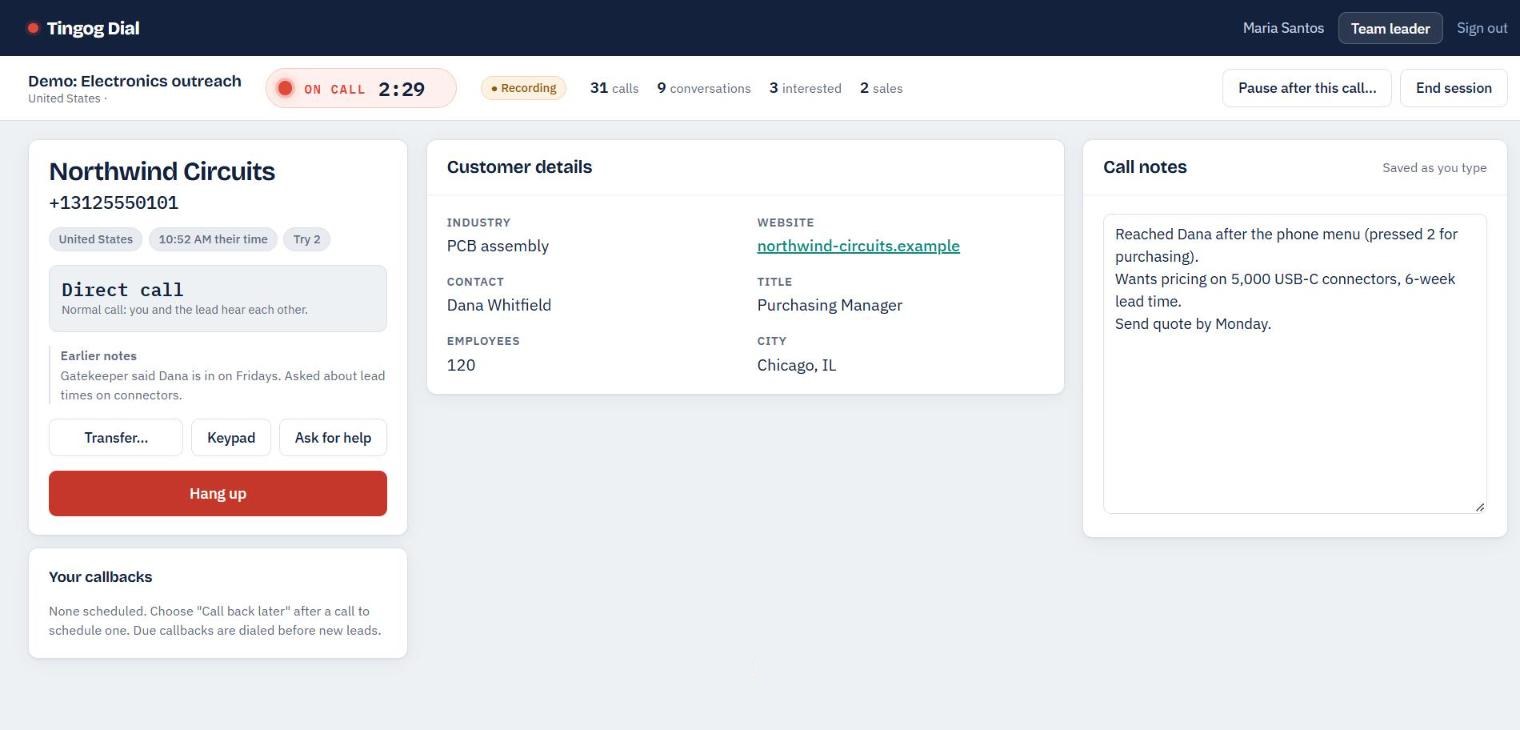
Tingog Dial agent console during an outbound call, demo data
Tingog Dial on a demo campaign. Names and numbers are sample data.

02 · Multilingual customer support

One support team, any caller's language

Inbound support line with callers who speak different languages

The challenge

Callers ring in speaking different languages, while the support team mostly speaks English. Hiring an agent for every language is not practical, callers who cannot be understood give up, and voicemails left in another language are hard to act on.

The solution

  • Automatic language detection on the inbound greeting, so each caller is recognized from the first words.
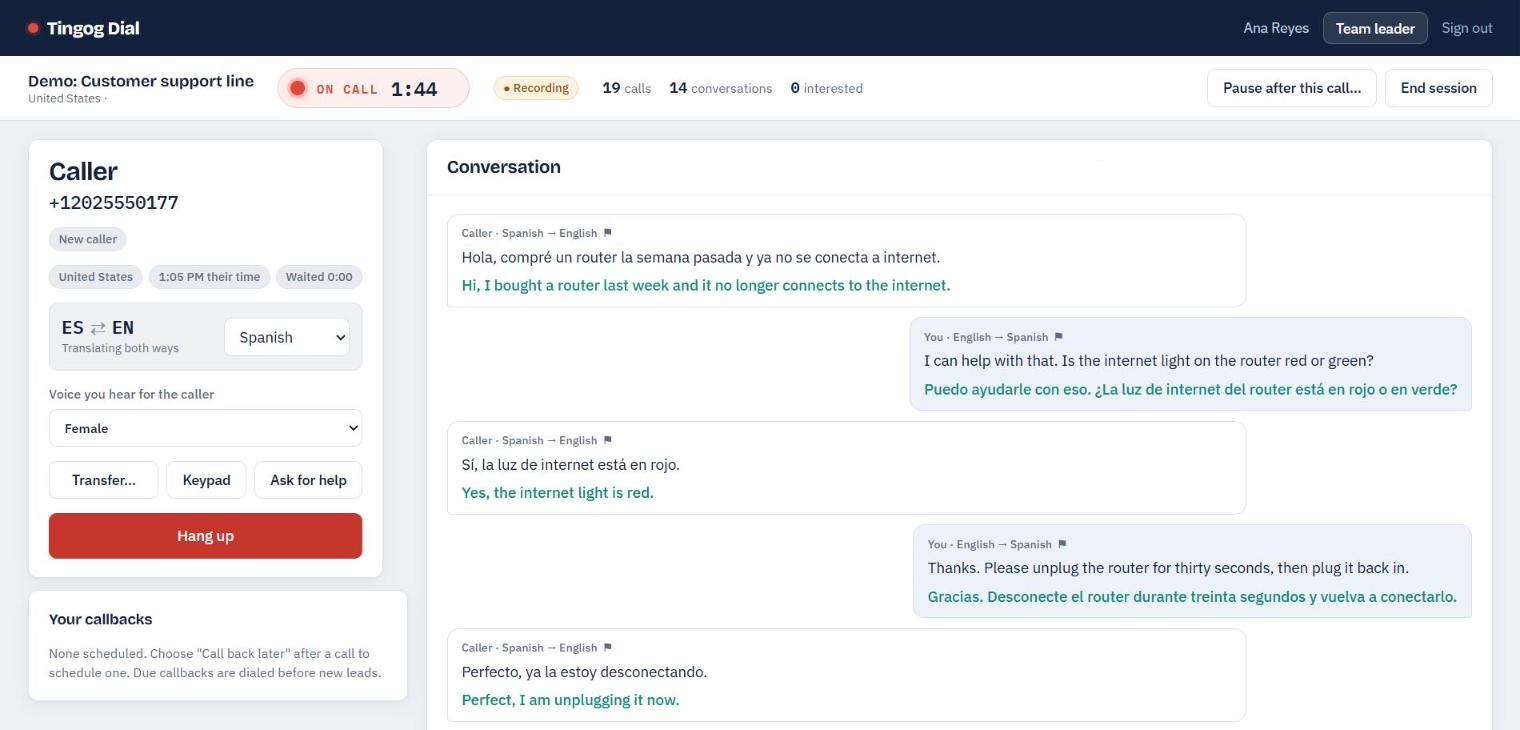
  • Live AI voice translation: it understands 60 languages and speaks 59, so an English-speaking agent talks with the caller in real time.
  • A live transcript and translation on the agent's screen throughout the call.
  • A queue with voicemail and a "press 2 for a callback" option when every agent is busy.
  • Voicemails transcribed and translated, so any agent can act on them.
  • Callbacks scheduled in the caller's own time zone.

What the line covers

  • 60 languages understood and 59 spoken on the same line
  • Voicemails in those languages arrive transcribed and translated
Tingog Dial live AI translation between Spanish and English, demo data
Tingog Dial on a demo campaign. Names and numbers are sample data.

03 · Moving off a legacy dialer

A VICIdial alternative with no servers to look after

Call center team replacing a self-hosted VICIdial setup

The challenge

Prospects who answered waited too long before an agent came on, and many hung up. The dialer ran on servers the team had to keep running themselves, and the reporting was limited.

The solution

  • Agents work in Chrome with a headset: no softphone installs and no on-site servers.
  • Automatic (progressive) dialing that connects the next lead when an agent is free.
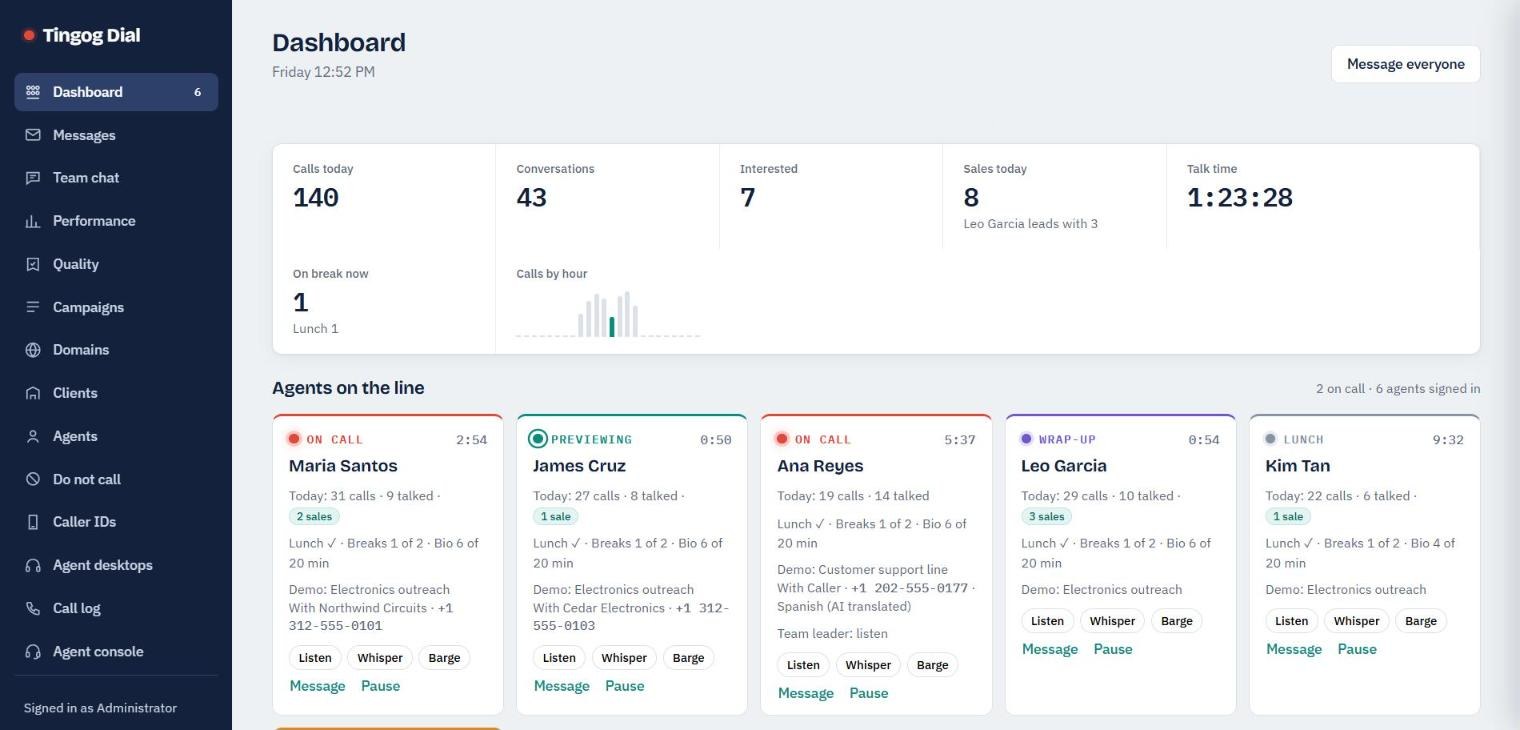
  • A live dashboard for team leaders, with Listen, Whisper and Barge.
  • Two-way team chat between team leaders and agents.
  • Break tracking for lunch, short breaks and bio breaks, with daily allowances.
  • Call recording, QA scorecards and coaching notes, plus a sales ping and leaderboard.
  • Custom outcomes per campaign, performance reports and CSV exports for admins.
Tingog Dial team leader dashboard, demo data
Tingog Dial on a demo campaign. Names and numbers are sample data.

How it works

From Twilio numbers to live calls in four steps

Connect your Twilio numbers

Link your own Twilio account and choose the numbers you want to call from and take calls on. Your calls run on Twilio's voice network.

Upload your leads

Import your lead list into a campaign, set your calling hours, retry rules and outcomes, and pick Automatic or Preview dialing.

Agents sign in from the browser

Agents open Tingog Dial in Chrome, put on a headset and start calling. Nothing to install on their computers.

Team leaders watch the live dashboard

See who is on a call, in a break or waiting, listen in or whisper to coach, and track results as they happen.

Features

What your team gets

Everything an outbound sales floor or an inbound support line needs, in one browser tab.

01

Automatic and Preview dialing

A progressive dialer that calls the next lead when an agent is free, or Preview mode when agents need to read up before each call.

02

Local presence

Calls show a caller ID from the lead's area code. Caller IDs rotate with daily limits, and spam alerts let you rest and replace a number in one click.

03

Calling hours by time zone

Every lead is called within the hours of their own time zone, including the US and Canada, with Canadian holidays and hours rules.

04

Voicemail detection that keeps menus

Hangs up on real voicemails at the beep but stays connected to company phone menus, with a keypad to navigate them.

05

Smart retries and callbacks

No answer, busy and voicemail leads are retried after a set gap. Callbacks are scheduled in the lead's time zone, and returned calls ring the assigned agent.

06

Inbound campaigns

Greeting, automatic language detection, queue, voicemail and "press 2 for a callback", with voicemails transcribed and translated.

07

Live AI call translation

Understands 60 languages and speaks 59, with a live transcript and translation on screen, for a multilingual call center without extra hires.

08

Team leader tools

Live dashboard, Listen / Whisper / Barge, team chat, break tracking, QA scorecards and coaching notes, sales ping and leaderboard.

Security & compliance

Your calls and recordings stay yours

Recordings in your own Twilio account

Call recordings are stored in the client's own Twilio account, with an optional recording notice played to callers.

Do-not-call list

Numbers marked Do not call are kept off every campaign.

Role-based access

Separate roles for admin, team leader, QA, IT and agent, so each person sees only what their job needs.

Each client sees only its own data

Every client has its own Twilio account, users and data, and can have its own web address.

FAQ

Questions managers ask us

What do we need to get started?

A Twilio account with the numbers you want to use, a headset for each agent, and the Google Chrome browser. There are no softphones to install and no servers to run.

Which languages does the AI translation support?

Live AI voice translation understands 60 languages and speaks 59. An English-speaking agent can talk with a Spanish, Arabic, Japanese or French speaker in real time, with a live transcript and translation on screen.

Can we use our own domain?

Yes. Each client can have its own web address, for example tingog.yourcompany.com.

Who owns our call data?

Each client has its own Twilio account, users and data, and call recordings are stored in your own Twilio account. Admins can export reports as CSV.

Book a demo

Book a 20-minute demo

See Tingog Dial on a demo campaign: dialing, voicemail detection, live translation and the team leader dashboard. Tell us how your team calls and we will show you the parts that matter to you.

  • 20 minutes, online
  • Shown on a demo campaign, never live customer data
  • We usually reply within one business day
Your calls are

We use your details to arrange your demo and follow up about Tingog Dial, as explained in our Privacy Policy.